Installing MCP Servers
Before starting to build VibeBlog, I set up my development environment and installed several useful MCP (Model Context Protocol) servers to improve development efficiency.
🔗 Quick Links
Here are quick links to all MCP servers and related resources mentioned in this article. Click to access directly:
MCP Official Resources
- 🌐 MCP Official Website - https://modelcontextprotocol.io/
- 📦 MCP GitHub Organization - https://github.com/modelcontextprotocol
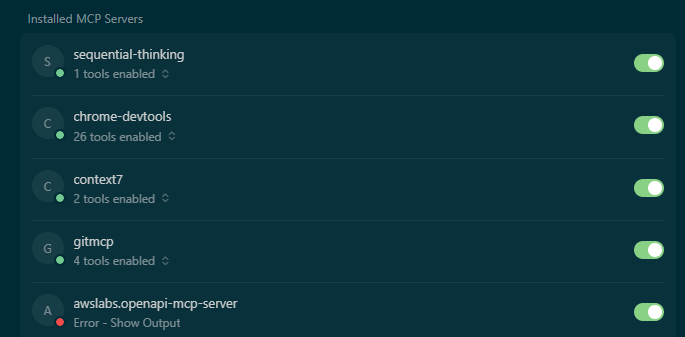
Installed MCP Servers
-
sequential-thinking
Sequential thinking tool (built-in MCP tool, no additional installation needed) -
chrome-devtools
🔗 Chrome DevTools Protocol Documentation
https://chromedevtools.github.io/devtools-protocol/
Provides 26 tools for browser debugging, network monitoring, performance analysis, etc. -
context7
🔗 Context7 Official Website
https://context7.com/
For fetching library documentation and code examples, supports multiple libraries -
gitmcp
🔗 MCP Servers List (GitHub)
https://github.com/modelcontextprotocol/servers
🔗 GitHub Official Website
https://github.com
For searching GitHub code, fetching documentation, semantic search, etc. -
awslabs.openapi-mcp-server
🔗 AWS Labs GitHub
https://github.com/awslabs
🔗 OpenAPI Official Website
https://www.openapis.org/
⚠️ Currently has configuration issues, pending fix
Related Technical Documentation
- 🔗 Chrome DevTools Protocol Documentation - https://chromedevtools.github.io/devtools-protocol/
- 🔗 Anthropic Official Website - https://www.anthropic.com/
💡 Tip: All links open in new tabs, so you can easily return to continue reading. Each link shows the full URL for easy copying or sharing.
What is MCP?
Model Context Protocol (MCP) is an open standard launched by Anthropic in November 2024, designed to provide standardized interfaces for Large Language Model (LLM) applications, enabling them to connect and interact with external data sources and tools.
The core goal of MCP is to overcome the limitations of LLM applications that rely solely on their training data, enabling them to dynamically acquire the contextual information needed to perform a wider range of tasks. By defining a set of common guidelines and formats, MCP enables LLM applications to acquire relevant information and perform operations when needed, thereby enhancing their functionality and scope of use.
For more information about MCP, you can refer to:
Installed MCP Servers
1. sequential-thinking
- Number of Tools: 1 tool enabled
- Status: ✅ Active
- Purpose: Provides sequential thinking functionality to help with complex problem analysis and solving
- Description: This tool helps AI perform structured thinking processes, breaking down complex problems into multiple steps for step-by-step analysis and resolution.
2. chrome-devtools
- Number of Tools: 26 tools enabled
- Status: ✅ Active
- Purpose: Powerful Chrome DevTools integration for browser debugging, network monitoring, and more
- Features:
- Browser page screenshots and snapshots
- Network request monitoring and analysis
- Console message viewing
- Page element manipulation (clicking, filling forms, etc.)
- Performance analysis
- Related Resources:
3. context7
- Number of Tools: 2 tools enabled
- Status: ✅ Active
- Purpose: Provides the latest library documentation and code examples, perfect for quickly finding API documentation
- Features:
- Automatically resolves library names and retrieves corresponding Context7-compatible IDs
- Fetches the latest library documentation and code examples
- Supports multiple modes: code (API references and code examples) and info (conceptual guides and architectural explanations)
- Use Cases: When developing VibeBlog, I frequently use context7 to quickly find the latest documentation and best practices for frameworks like SvelteKit and TypeScript.
- Related Links:
4. gitmcp
- Number of Tools: 4 tools enabled
- Status: ✅ Active
- Purpose: Git and GitHub integration for searching code, fetching documentation, etc.
- Features:
- Fetch complete documentation from GitHub repositories
- Semantic search within documentation
- Search code (using GitHub Search API)
- Fetch content from any URL
- Use Cases: During development, I use gitmcp to search for VibeBlog-related code and documentation, helping understand project structure and implementation details.
- Related Links:
- 🔗 MCP Servers List (GitHub) - Find gitmcp related information
- 🔗 GitHub Official Website
5. awslabs.openapi-mcp-server
- Status: ❌ Error
- Note: This server currently has an error and requires further configuration checks
- Expected Functionality: Provides OpenAPI specification API integration features
- Related Links:
Why Choose These MCP Servers?
Reasons for choosing these MCP servers during VibeBlog development:
- Improve Development Efficiency: context7 and gitmcp allow me to quickly find documentation and code without frequently switching browser tabs.
- Enhance AI Capabilities: sequential-thinking helps AI perform more structured thinking, making it more reliable when solving complex problems.
- Real Testing: chrome-devtools allows AI to directly operate browsers, test website functionality, ensuring every development step is verified.
- Aligns with Workflow: According to VibeBlog's design philosophy, we emphasize "for each required step, use chrome-devtools to open the browser and actually operate according to functionality, confirming everything works before proceeding to the next step."
Setup Screenshot
Real-World Use Cases
These MCP servers played important roles during VibeBlog development:
- Using context7 to Find SvelteKit Documentation: When implementing multi-language support, quickly found SvelteKit 5 runes mode documentation to understand the correct usage of
$derivedand$state. - Using chrome-devtools to Test Features: When implementing the tag system, actually opened the browser to test routing and language switching functionality, ensuring everything works correctly.
- Using gitmcp to Search Project Documentation: When needing to understand project structure, directly searched for relevant documentation and code in the GitHub repository.
- Using sequential-thinking to Solve Complex Problems: When designing the Precomputed Tags architecture, used the sequential thinking tool to analyze problems, design solutions, and verify feasibility.
Next Steps
With these MCP servers, I can more efficiently:
- Quickly find and learn new libraries
- Perform complex problem analysis
- Debug and test applications
- Manage Git repositories and code
Next, I will continue using these tools to improve VibeBlog's functionality and explore more possibilities with MCP servers.
References
- MCP Official Website - Learn detailed information about the MCP protocol
- MCP GitHub Organization - View official MCP servers and tools
- Chrome DevTools Protocol - Chrome DevTools Protocol documentation